
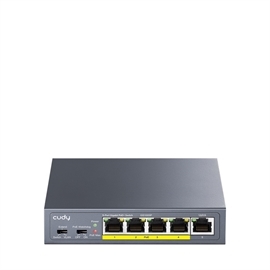
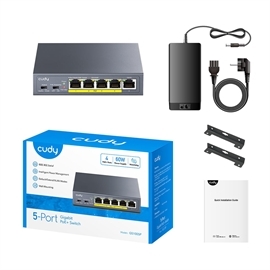
Cudy Switch GS1005P 5-Port 10/100/1000M PoE+ Switch 60W Retail
| Status: | Available |
| SKU: | 301765 |
| Vendor: | Cudy |
| MPN: | GS1005P |
| UPC: | 644925514923 |
| EAN: | 6971690790998 |
|
IEEE 802.3at/af. Up to 30W Per Port. Each PoE port delivers up to 30W of power, making it suitable for access points, IP cameras, digital signage, and most other PoE devices. PoE Auto Recovery Watchdog will be enabled under VLAN and Extend modes, and if a connected device freezes and stops transmitting data for 5 minutes, the Watchdog will automatically reboot the corresponding PoE port. Extend for 250 m Transmission For long-distance networking, enable the Extend mode to connect clients up to 250 meters away by limiting the port speed to 10 Mbps. VLAN Isolates Downlink Ports for Improved Safety Turn on the VLAN mode to prevent client-side hacking, preventing sensitive data from leaking. The downlink clients will only be able to communicate with the uplink devices. Plug and Play Connect your router to the uplink port, client devices to PoE ports, and power on the PoE switch—then you're good to go. Fit into a Distribution Box Fits easily into most distribution boxes and makes cable management a breeze. Protect Clients with Outstanding EMC Shield your cameras and access points, from surges in power grid and ESD, delivering rock-solid reliability. • ESD: Contact 6kV; Air 8kV • Surge: Power DM 2kV, CM 4kV; RJ45 CM 4kV |
|
| Interfaces Gigabit RJ45 Ports 5 Gigabit RJ45 PoE Ports Number1 to Number4 Max Power on a Single PoE Port 30W PoE Port Notes The PoE ports comply with IEEE 802.3at/af standards. PoE Priority Intelligent Power Management: Automatically disconnect the lastly powered device when power exceeds budget. Shielded RJ45 Port True Extend Mode PortsNumber 1 to Number4 VLAN Mode PortsNumber 1 to Number4 LED Power PoE Status of Each PoE Port Link/ACT of Each Ethernet Port PoE Max Status Power Interfaces DC Jack Physical Buttons VLAN/Default/Extend DIP Switch PoE Watchdog On/Off Physical Buttons Note The PoE Watchdog will attempt to reboot the plugged-in clients that have been inactive for 5 minutes. Do not turn it on for clients with online auto-upgrade feature. |
Performance Copper Speed and Distance Cat. 3 or higher cable: 100 meters at 10 Mbps Cat. 5 or higher cable: 100 meters at 100 Mbps Cat. 5e or higher cable: 100 meters at Gigabit Cat. 5e or higher cable: 250 meters at 10 Mbps Copper Speed and Distance Note 250-meter transmission is only available on the Extend Mode ports when the Extend Mode is activated. MAC Address Table 2048 Max Switching Capacity 10 Gbps Max Forwarding Rate 7.44 Mpps Jumbo Frame 15 KB Packet Buffer 3 Mbit |